

Description
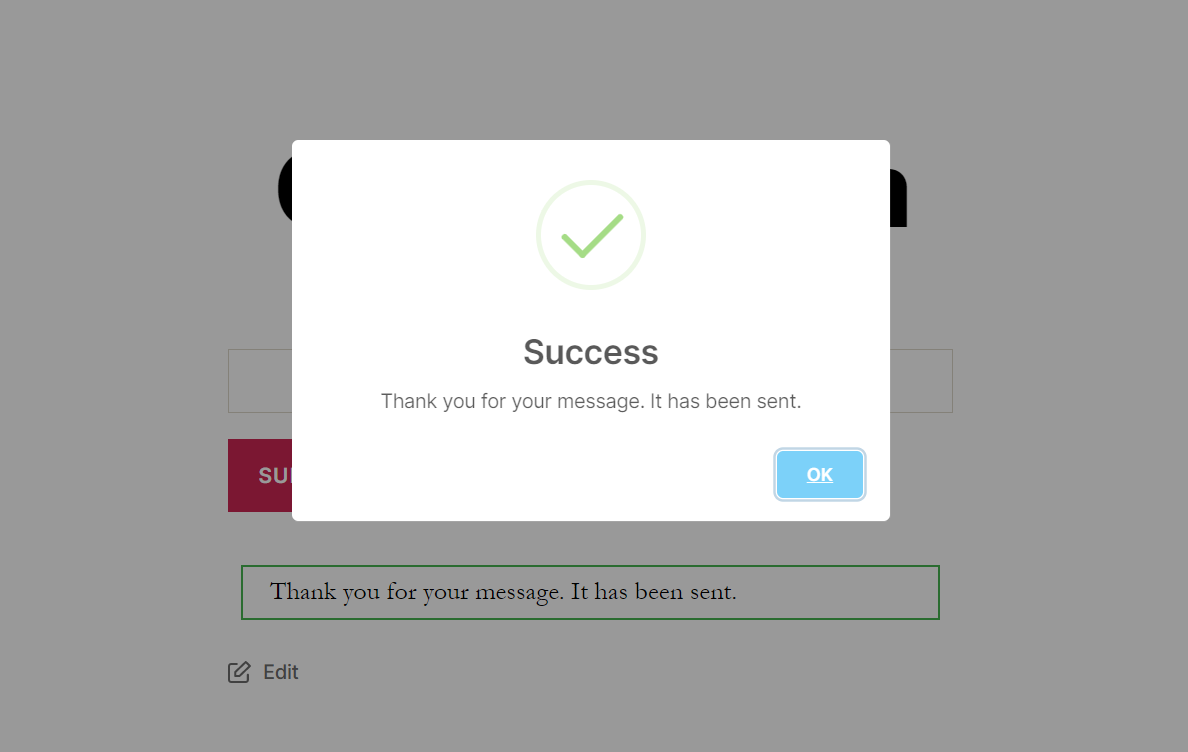
Message Popup For Contact Form 7 replaces the default inline success message from Contact Form 7 with a stunning, fully branded popup notification. When a visitor submits your CF7 form, instead of a plain text confirmation they might easily miss, they are greeted with a bold, centered popup modal that clearly confirms their submission was received.
Every visual detail of the success popup is configurable directly from the Contact Form 7 editor panel — no shortcodes, no custom CSS, and no coding required. Adjust popup size, colors, borders, button text, and set an auto-close timer — all from the WordPress admin.
Requires Contact Form 7 to be installed and activated on your WordPress site.
📄 Documentation | 🔴 Live Demo | ⭐ Upgrade to Pro
Why Replace the Default Contact Form 7 Message?
The built-in Contact Form 7 success message appears inline — often below the fold — and blends quietly into the page. Many visitors never notice it, which creates confusion and may lead to duplicate form submissions. Message Popup For Contact Form 7 solves this by displaying a prominent, centered popup the moment a form is submitted, so your users always know exactly what happened.
Free Features
Success Popup Notification
* Enable or disable the success popup independently for each Contact Form 7 form on your site
* Set a fully custom success message text to display in the popup — or fall back to CF7’s default confirmation message
* Per-form popup configuration — assign unique success popup settings to different CF7 forms across your site
Popup Appearance & Styling
* Popup Width — Set the exact width of the popup modal (e.g. 478px) to fit your layout
* Popup Border Radius — Round the popup corners to match your site’s design style (e.g. 5px)
* Popup Background Color — Choose a custom background color for the popup modal
* Background Overlay Color — Set the color and opacity of the overlay that appears behind the popup
* Popup Border Width — Control the thickness of the popup border
* Popup Border Color — Select a custom border color for the popup
* Popup Text Color — Set the font color of the success message text inside the popup
* Button Background Color — Customize the background color of the popup close/OK button
Popup Behavior
* Custom Button Text — Change the label of the popup close/confirm button to any text you want (e.g. “Got it!”, “Thanks!”, “Close”)
* Auto-Hide Timer — Set the popup to automatically close after a defined number of milliseconds (e.g. 5000 = 5 seconds) without requiring user interaction
Pro Version Features
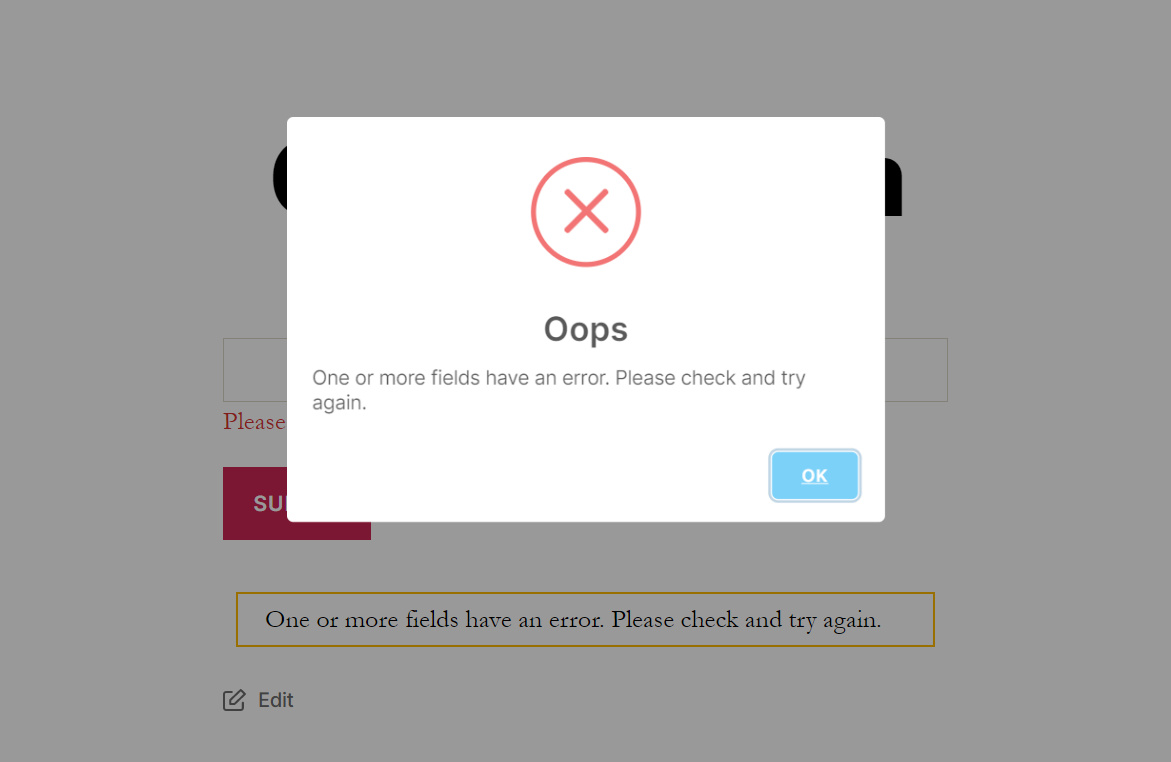
Upgrade to Message Popup For Contact Form 7 Pro to unlock full control over the failure/error popup — shown when a form submission fails validation or the mail cannot be sent.
Failure Popup Notification
* Enable Failure Message — Toggle on a dedicated popup for failed or invalid CF7 form submissions, separate from the success popup
* Custom Failure Message Text — Write a specific error message to guide users when their submission fails
* Failure Button Text — Customize the label on the failure popup’s close/retry button independently from the success button
Failure Popup Appearance & Styling
* Failure Popup Width — Set the width of the failure popup independently from the success popup
* Failure Popup Border Radius — Control the corner roundness of the failure popup
* Failure Popup Background Color — Choose a distinct background color for the error popup (e.g. light red to signal an error)
* Failure Background Overlay Color — Set a custom overlay color behind the failure popup
* Failure Popup Border Width — Define the border thickness for the failure popup
* Failure Popup Border Color — Select a custom border color for the error popup
* Failure Popup Text Color — Set the text color inside the failure popup
* Failure Button Background Color — Customize the close/retry button color on the failure popup
Failure Popup Behavior
* Failure Auto-Hide Timer — Set the failure popup to automatically close after a specified duration (in milliseconds), separate from the success popup timer
Pro license is lifetime and valid for unlimited sites — outstanding value for agencies and freelancers.
Perfect For
- Contact and enquiry forms where submission confirmation visibility is critical
- Lead generation and landing page forms that need a professional thank-you response
- Booking and appointment request forms
- Event registration and RSVP forms
- Support and help desk ticket submission forms
- Any CF7 form where the default inline message is too easy to miss
How It Works
- Install and activate the plugin (Contact Form 7 must already be active).
- Open any Contact Form 7 form in your WordPress admin — you will see a new Popup Setting tab.
- Enable the success popup and configure your message, colors, borders, button text, and auto-hide timer.
- Save the form. That’s it!
When a visitor submits the form on the front end, the standard CF7 inline message is replaced by your fully styled popup modal, appearing centered on screen.
What Users Are Saying
“The plugin works perfectly. The support is very fast, efficient and helpful.” — markkim
“Very good plugin, easy to configure.” — xoruna
“This is a good plugin… Pro version is good value as it’s lifetime unlimited sites.” — gregsloman
Screenshots
Installation
From the WordPress Plugin Directory:
- Make sure Contact Form 7 is installed and activated on your WordPress site.
- In your WordPress dashboard, go to Plugins > Add New.
- Search for “Message Popup For Contact Form 7” and click Install Now.
- Click Activate after installation completes.
- Open any Contact Form 7 form — navigate to the Popup Setting tab.
- Enable the success popup, customize the appearance, and click Save.
- Visit your site and submit the form to see the popup in action.
Manual Upload:
- Download the plugin ZIP file.
- In your WordPress dashboard, go to Plugins > Add New > Upload Plugin.
- Upload the ZIP and click Install Now, then Activate.
- Follow steps 5–7 above.
FAQ
-
Does this plugin require Contact Form 7?
-
Yes. Contact Form 7 must be installed and activated. This plugin extends CF7 and does not work independently.
-
Where do I configure the popup settings?
-
The settings appear as a Popup Setting tab inside the Contact Form 7 form editor. Go to Contact > Contact Forms, edit any form, and click the Popup Setting tab.
-
Can I assign different popup styles to different Contact Form 7 forms?
-
Yes. Each CF7 form has its own independent popup settings, so you can use a completely different popup design, message, and behavior for each form on your site.
-
Can I customize the popup message text?
-
Yes. You can enter a custom success message in the plugin settings. If you leave the field blank, the plugin falls back to displaying CF7’s own default confirmation message.
-
Yes — custom button text is included in the free version. Enter any label you want for the close/OK button (e.g. “OK”, “Got it!”, “Thanks!”).
-
Can the popup close automatically after a few seconds?
-
Yes — auto-hide with a custom timer is included in the free version. Enter a value in milliseconds (e.g. 5000 for 5 seconds) and the popup will close automatically after that delay.
-
Does the free version support a popup for failed or invalid submissions?
-
No. The failure/error popup — shown when form validation fails or the email cannot be sent — is a Pro version feature. Upgrade here.
-
Is the popup mobile-friendly?
-
Yes. The popup is fully responsive and adapts correctly to all screen sizes including smartphones, tablets, and desktops.
-
Does the plugin slow down my website?
-
No. Scripts and styles are lightweight and only loaded on pages that contain a Contact Form 7 form.
-
Is the Pro version worth it?
-
The Pro version is a one-time lifetime payment valid for unlimited sites. If you need a distinct, fully styled error popup for failed submissions in addition to the success popup, it is excellent value — especially for agencies managing multiple client sites.
-
Where can I find documentation?
-
Full setup and usage documentation is available at topsmodule.com.
Reviews


Contributors & Developers
“Message Popup For Contact Form 7” adalah perisian sumber terbuka. Orang-orang berikut telah menyumbang kepada pemalam ini.
Penyumbang
Translate “Message Popup For Contact Form 7” into your language.
Berminat dalam pembangunan?
Layari kod, periksa repositori SVN, atau langgani log pembangunan dengan RSS.
Changelog
1.0
- Initial release — Replace Contact Form 7 inline messages with fully customizable success popup notifications. Free version includes complete success popup styling, custom button text, and auto-hide timer. Pro version adds full failure/error popup support.