

Description
WPC Dimensly for WooCommerce is a WooCommerce plugin for stores that sell products by measurement rather than fixed units, such as flooring, fabric, wallpaper, framing, or liquids.
It adds a calculator to the product page, allowing customers to enter the dimensions they need and see the measurement and price update as they type.
Key features
- Measurement types: Support for length, area, volume, weight, and custom formulas.
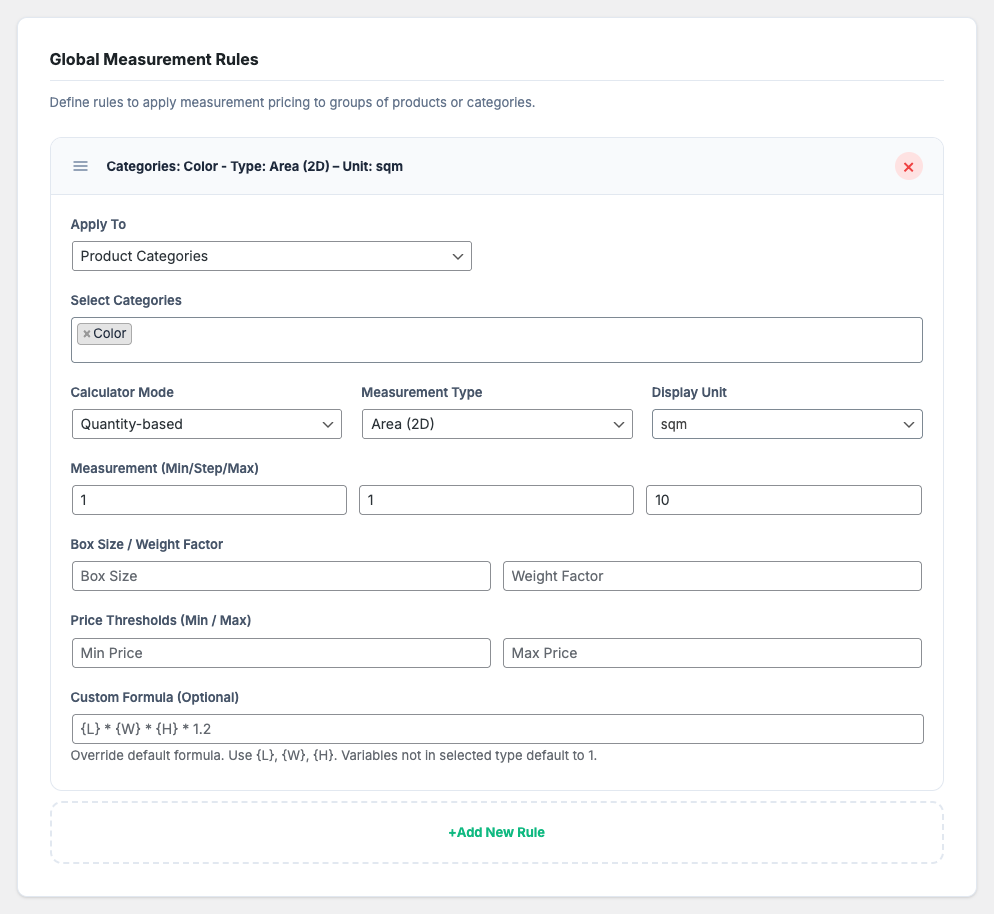
- Global rules: Apply measurement settings to all products, specific products, or product categories (Premium), and reorder rules by drag and drop.
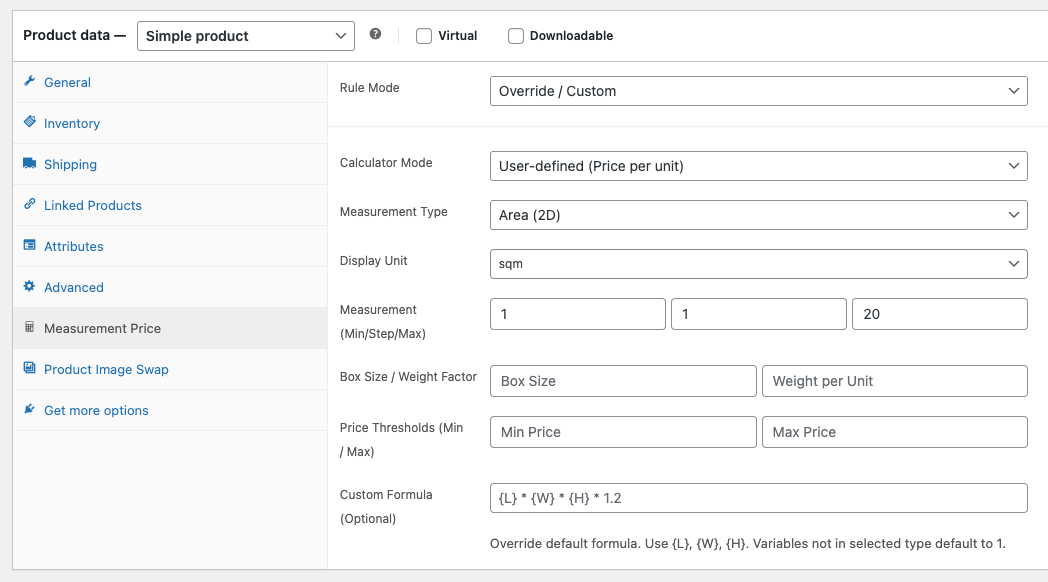
- Product and variation settings: Override the global rules for a single product or for individual variations.
Features in detail
1. Box Rounding
For products sold in fixed packages (like tiles or floor planks), set a box size. The plugin rounds the entered measurement up to a whole number of boxes, and the calculator shows the equivalent number of boxes.
2. Custom Formulas
Beyond the standard area (L x W), you can create arithmetic expressions (+, -, *, / and parentheses) using the variables {L}, {W}, and {H}. For example, a frame shop can use ( ( {L} + {W} ) * 2 ) / 100 to calculate the perimeter in meters.
3. Rule Inheritance
Settings are applied in this order:
* Global Rules: Set a default calculator for all products, specific products, or product categories (Premium).
* Product Overrides: Use different settings for a specific product.
* Variation Overrides: Assign different units or formulas to individual variations.
4. Shipping Weight Mapping
Set a weight per measurement unit, and the plugin calculates the cart item’s weight from the customer’s measurement. For example, if a customer buys 10m of fabric, the item weight is 10 times the weight set per meter.
Use Cases
- Tile & flooring shop: Use “Quantity-based” mode with “Area” type and a box size. If a box covers 1.44 sqm and the customer needs 10 sqm, the measurement is rounded up to 10.08 sqm (7 boxes).
- Textile store: Use “Length” type so customers buy fabric by the meter. In “User-defined” mode, you can also set a minimum price for small orders.
- Aquarium builder: Use “Volume” type to calculate the measurement from Length, Width, and Height inputs, and set a weight per unit to map the item weight.
- Printing service: Use a custom formula to calculate the billable area of a banner from its length and width.
Screenshots

Installation
- Upload the plugin files to the
/wp-content/plugins/dimensly-for-woocommercedirectory, or install the plugin through the WordPress plugins screen directly. - Activate the plugin through the ‘Plugins’ screen in WordPress.
- Navigate to WPClever > Measurement Price Calculator to configure global rules.
- (Optional) Edit any product to override its measurement settings.
Reviews
There are no reviews for this plugin.
Contributors & Developers
“WPC Dimensly – Measurement Price Calculator for WooCommerce” adalah perisian sumber terbuka. Orang-orang berikut telah menyumbang kepada pemalam ini.
Penyumbang
Translate “WPC Dimensly – Measurement Price Calculator for WooCommerce” into your language.
Berminat dalam pembangunan?
Layari kod, periksa repositori SVN, atau langgani log pembangunan dengan RSS.
Changelog
1.2.0
- Updated: Optimized the code
- Updated: Compatible with WP 7.1 & Woo 11.2
1.0.1
- Fix: Add nonce verification and cart authorization for edit item action.
- Update: Update plugin and author links.
1.0.0
- Initial release.