Description
Celestial Lunar Phase Widget helps WordPress sites display the current moon phase in a polished astronomy card.
The plugin shows:
- Current lunar phase name
- Moonrise time
- Moonset time
- Illumination percentage
- Bundled moon phase image matched to the returned phase
- Optional location label
- Optional WeatherAPI credit line
It includes both a classic shortcode and a Gutenberg block, so site owners can add lunar data in the editor or in traditional content areas.
Ideal for
- Astronomy and space science websites
- Observing clubs and public outreach pages
- Weather and nature blogs
- Classroom and education sites
- Hobbyist websites that want a live moon phase widget
Key features
- Shortcode:
[celestial_lunar_phase_widget] - Gutenberg block: Celestial Lunar Phase Widget
- Eight bundled moon phase photos packaged locally
- Default location and title settings
- 12-hour or 24-hour time display
- Per-location and per-date caching for better performance
- No visitor geolocation in the browser, so your API key stays server-side
Support
Support and documentation are available at:
https://celestialwebdevelopment.com/lunar-phase-plugin/
Blocks
Celestial Lunar Phase Widget
Display the current moon phase with a bundled moon image, phase name, moonrise, moonset, and illumination.
External Services
This plugin connects to the following external service:
WeatherAPI
- Service URL:
https://api.weatherapi.com/v1/astronomy.json - What the service does: Returns moon phase, moonrise, moonset, and illumination data for the requested location and date.
- When data is sent: Only when the block or shortcode is rendered and no cached response is available.
- What data is sent: The site administrator’s WeatherAPI key, the configured location or override location, and the selected date.
- Service provider: WeatherAPI
- Terms of use:
https://www.weatherapi.com/terms.aspx - Privacy policy:
https://www.weatherapi.com/privacy.aspx
Screenshots
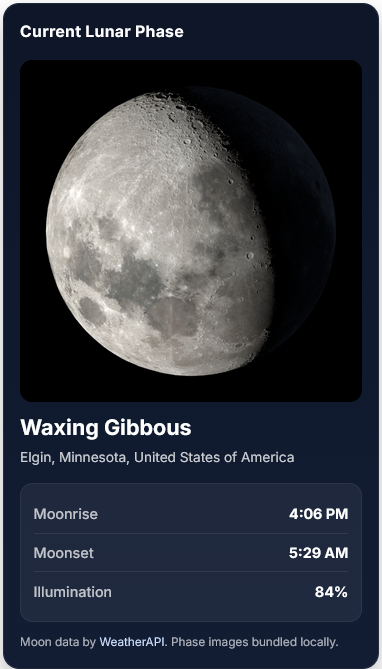
Front-end widget showing the current lunar phase, location, moonrise, moonset, and illumination. 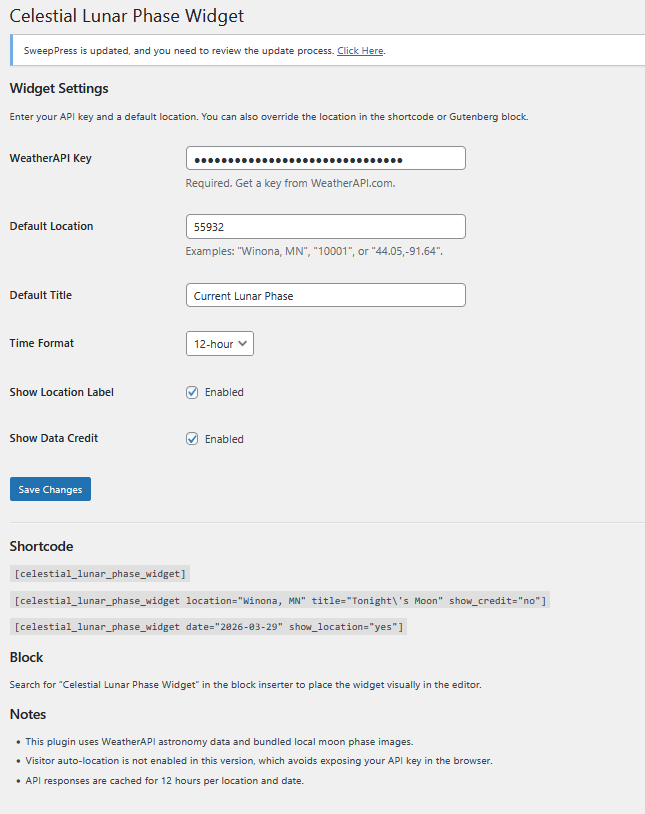
Settings screen for WeatherAPI key, default location, time format, and shortcode examples.
Blocks
This plugin provides 1 block.
- Celestial Lunar Phase Widget
Installation
- Upload the plugin folder to
/wp-content/plugins/or install the ZIP from Plugins > Add New > Upload Plugin. - Activate the plugin.
- Go to Settings > Celestial Lunar Phase Widget.
- Enter your WeatherAPI key.
- Set a default location.
- Add the Celestial Lunar Phase Widget block or place
[celestial_lunar_phase_widget]into a post, page, or widget area.
FAQ
-
Does the plugin include moon images?
-
Yes. Eight moon phase images are bundled locally inside the plugin package.
-
Does the plugin include a Gutenberg block?
-
Yes. Version 1.1.0 includes a dynamic Gutenberg block with editor controls for location, date, title, and display options.
-
Does the plugin need an API key?
-
Yes. The plugin uses WeatherAPI to retrieve moon phase, moonrise, moonset, and illumination data.
-
Does the plugin auto-detect each visitor location?
-
No. This version uses the saved default location or a block/shortcode override.
-
Where can I get support?
-
Support is available at:
https://celestialwebdevelopment.com/lunar-phase-plugin/
Reviews
There are no reviews for this plugin.
Contributors & Developers
“Celestial Lunar Phase Widget” adalah perisian sumber terbuka. Orang-orang berikut telah menyumbang kepada pemalam ini.
Penyumbang
Translate “Celestial Lunar Phase Widget” into your language.
Berminat dalam pembangunan?
Layari kod, periksa repositori SVN, atau langgani log pembangunan dengan RSS.
Changelog
1.1.0
- Added a dynamic Gutenberg block with editor preview.
- Added WordPress.org screenshot assets and improved submission readme.
- Updated plugin author, support, and company branding to Celestial Web Development.
1.0.0
- Initial release.