

Description
AI Internal Links uses artificial intelligence to automatically suggest and insert relevant internal links in your WordPress content. Save hours of manual work while improving your site’s SEO performance.
🚀 Why Internal Links Matter for SEO
Internal linking is one of the most important on-page SEO factors. Good internal linking:
- Improves Site Structure – Helps search engines understand your content hierarchy
- Distributes Page Authority – Passes link equity to important pages
- Increases Engagement – Keeps visitors on your site longer
- Boosts Rankings – Helps pages rank higher in search results
- Enhances Crawlability – Makes it easier for search engines to discover content
✨ Features (Free Version)
- 🤖 AI-Powered Suggestions – Uses OpenAI’s GPT models to find relevant linking opportunities
- ⚡ One-Click Generation – Add button in WordPress editor to instantly generate links
- 🎯 Context-Aware – AI understands your content and suggests only relevant links
- 📝 Works with Posts & Pages – Support for default WordPress post types
- 🔧 Easy Configuration – Simple settings page to configure your OpenAI API key
- 🎨 Natural Anchor Text – AI chooses anchor text that flows naturally in context
- 📊 Debug Logging – Optional logging to troubleshoot API requests
🔥 Pro Version Features
Upgrade to AI Internal Links Pro for advanced features:
- 🎯 Custom Post Types – Support for WooCommerce products and custom post types
- 🌟 Multiple AI Providers – Claude, Google Gemini, Grok, DeepSeek, Mistral AI
- 🎨 Gutenberg Support – Native block editor integration
- 🏗️ Page Builder Support – Elementor & WPBakery integration
- 📦 Bulk Generation – Generate links for multiple posts at once
- 🔌 REST API – Secure REST API endpoints for automation and external integrations
- ⚙️ Advanced Controls – Custom prompts, link exclusions, and more
- 💬 Priority Support – Get help when you need it
Upgrade to Pro | View Documentation
Support
For support, please visit:
Screenshots
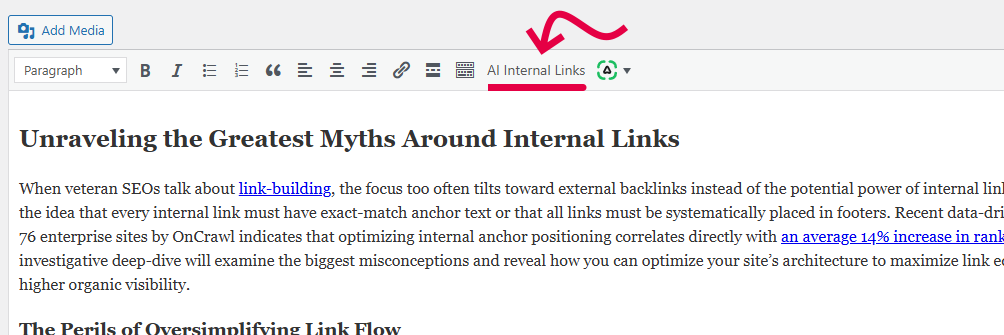
AI Internal Links button in WordPress editor 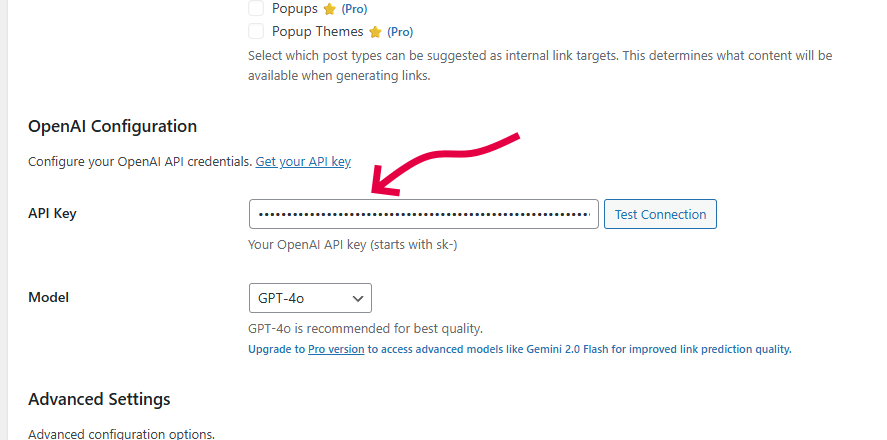
Settings page with OpenAI configuration 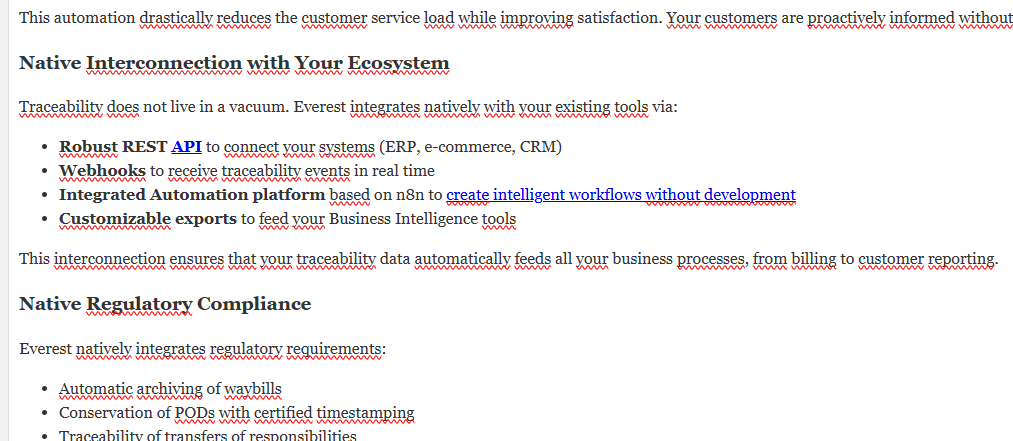
Link generation in action 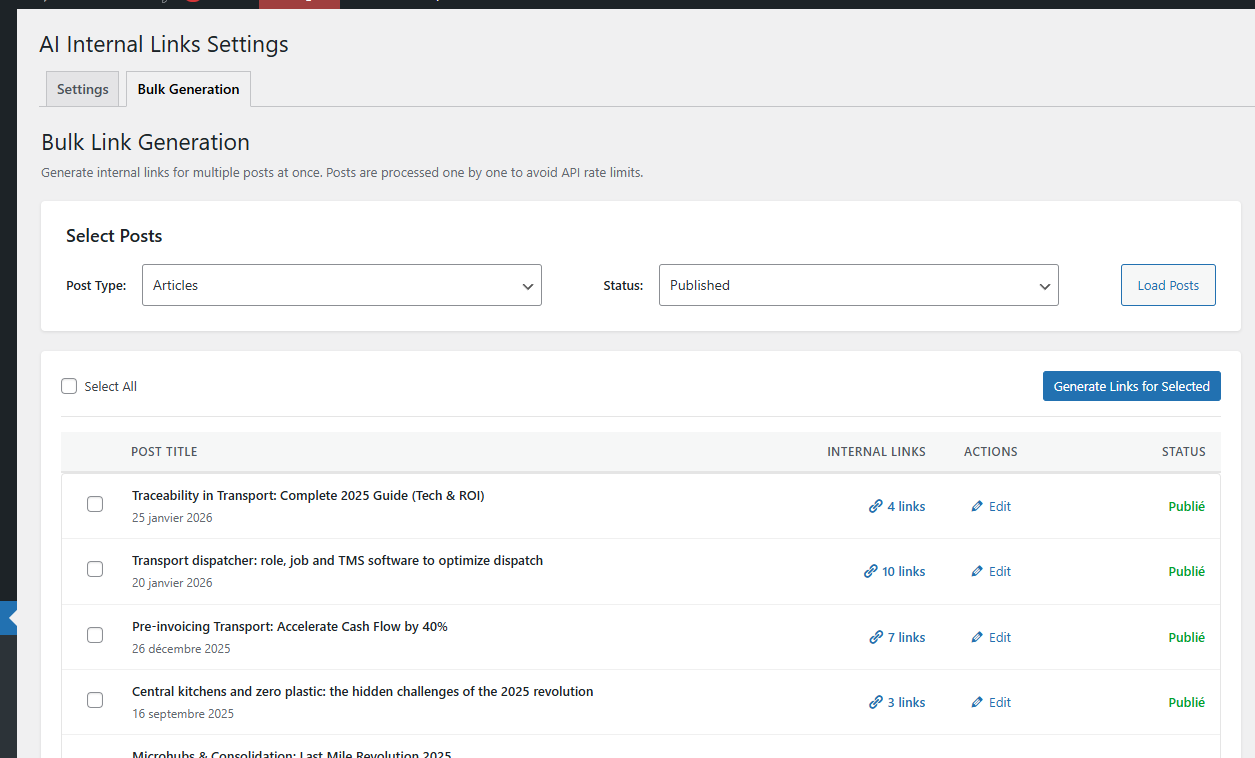
Generate bulk internal links
Installation
Automatic Installation
- Log in to your WordPress admin panel
- Go to Plugins > Add New
- Search for “AI Internal Links”
- Click “Install Now” and then “Activate”
Manual Installation
- Download the plugin ZIP file
- Log in to your WordPress admin panel
- Go to Plugins > Add New > Upload Plugin
- Choose the ZIP file and click “Install Now”
- Click “Activate Plugin”
Configuration
- Go to Settings > AI Internal Links
- Enter your OpenAI API key
- Choose your preferred AI model
- Set maximum number of links per article
- Save settings
FAQ
-
Do I need an OpenAI API key?
-
Yes, the free version requires an OpenAI API key. You can get one at platform.openai.com. OpenAI offers a free tier with credits to get started.
-
How much does it cost to use?
-
The plugin itself is free. You only pay for OpenAI API usage, which is typically a few cents per article. GPT-4o-mini is very affordable (approximately $0.01 per 1000 articles).
-
Will it work with my theme?
-
Yes! The plugin works with any WordPress theme. It integrates directly into the WordPress editor.
-
Can I customize the AI prompts?
-
Custom prompts are available in the Pro version. The free version uses optimized default prompts.
-
Does it work with Gutenberg?
-
The free version works with the Classic Editor (TinyMCE). Gutenberg support is available in the Pro version.
-
Will it slow down my site?
-
No. Link generation happens in the admin area when you click the button. There’s no impact on your site’s front-end performance.
-
Can I undo the changes?
-
Yes! The editor’s undo function (Ctrl+Z / Cmd+Z) works normally after links are inserted.
-
How many links should I add per article?
-
We recommend 3-5 internal links per article for most content. Quality and relevance are more important than quantity.
-
Does it support other languages?
-
Yes! The AI can generate links for content in any language that OpenAI supports.
-
Is my content secure?
-
Your content is sent to OpenAI’s API for analysis using HTTPS. OpenAI does not use API data for training. API keys are stored securely in your WordPress database.
Reviews

Contributors & Developers
“AI Internal Links” adalah perisian sumber terbuka. Orang-orang berikut telah menyumbang kepada pemalam ini.
Penyumbang
Translate “AI Internal Links” into your language.
Berminat dalam pembangunan?
Layari kod, periksa repositori SVN, atau langgani log pembangunan dengan RSS.
Changelog
1.0.9 – 2026-04-04
- Setting to define Anchor Text Length
- UX improments
- Bulk generation improvements
- PRO plugin auto updates
1.0.8 – 2026-03-13
- Improved link distribution across articles
- Fixed links being placed inside headings
- Improved anchor text length control (2-5 words)
- Updated OpenAI models list
1.0.6 – 2026-02-20
- Fixed link generation format compatibility issue
- Improved content replacement logic for better accuracy
1.0.5 – 2025-02-18
- Improved AI prompt to strictly forbid links in titles and headings
- Links are now only placed in paragraph text for better SEO practices
1.0.0 – 2025-01-25
- Initial release
- OpenAI GPT integration
- TinyMCE editor support
- Support for posts and pages
- Settings page with API configuration
- Debug logging option
- One-click link generation